> ## Documentation Index
> Fetch the complete documentation index at: https://docs.cura.so/llms.txt
> Use this file to discover all available pages before exploring further.
# Adding FAQs
> FAQs are the fastest way to make your AI answer common questions exactly the way you want.
FAQs are the fastest way to make your AI answer common questions *exactly* the way you want. Each one is a question paired with the precise answer your customers should receive.
By the end of this guide, you'll have added the questions customers ask most — hours, parking, deposits, "do you offer X?" — with answers in your own words.
## Before you begin
* You'll need **Admin** or **Manager** access to the workspace you're editing.
* Make sure you're in the right **workspace** — FAQs are per-workspace, so a multi-location business adds them separately for each one.
* Have a short list of the questions you get asked over and over, with the answer you'd give.
Documents in your Knowledge Base are great for background, but FAQs are exact. When a customer's question matches an FAQ, the AI uses your wording — so the answer is consistent every time.
***
* Open the **workspace** you're editing and go to its **FAQs** tab.
* Confirm you're in the correct workspace.
* **Question:** write it the way a customer would ask it, e.g. *"Do you take walk-ins?"*
* **Answer:** write the exact reply you want customers to receive. Keep it clear and complete.
* **Link (optional):** add a URL if there's a page that helps, such as a booking link or directions.
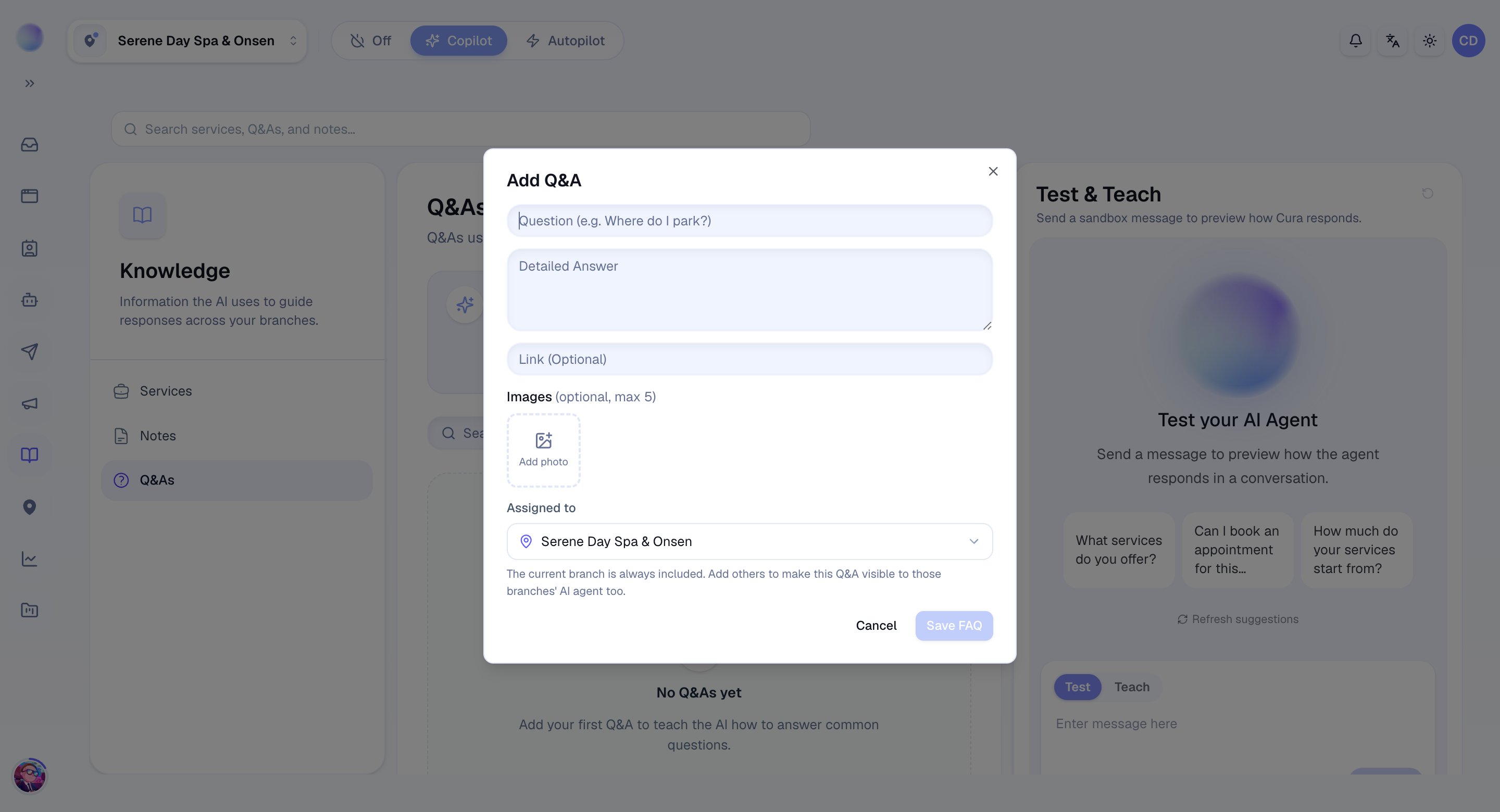 Your FAQ is saved and the AI will use it in matching conversations automatically.
Work through your most common questions. Good candidates include:
* **Opening hours** and which days you're closed.
* **Location, parking, and how to find you.**
* **Deposit and cancellation policy.**
* **"Do you offer \_\_\_?"** for treatments people often ask about.
* **Payment methods** you accept.
* Each FAQ can be **active** or **inactive**. Switch one off to stop the AI using it — without deleting it — then switch it back on later.
If the AI ever answers a common question imperfectly, the quickest fix is to add (or edit) an FAQ with the exact wording you prefer. It's faster than rewriting a document.
***
## Troubleshooting
* **The AI isn't using my FAQ.** Check the FAQ is **active** and saved in the same workspace as the conversation. Make sure the question is phrased the way customers actually ask it.
* **The answer feels outdated.** FAQs don't update themselves — edit the answer whenever a policy or price changes.
***
### Related articles
* [Build your Knowledge Base](/ai-agent/build-your-knowledge-base)
* [Adding Services and prices](/ai-agent/adding-services-and-prices)
* [How your AI agent works](/ai-agent/how-your-ai-agent-works)
Your FAQ is saved and the AI will use it in matching conversations automatically.
Work through your most common questions. Good candidates include:
* **Opening hours** and which days you're closed.
* **Location, parking, and how to find you.**
* **Deposit and cancellation policy.**
* **"Do you offer \_\_\_?"** for treatments people often ask about.
* **Payment methods** you accept.
* Each FAQ can be **active** or **inactive**. Switch one off to stop the AI using it — without deleting it — then switch it back on later.
If the AI ever answers a common question imperfectly, the quickest fix is to add (or edit) an FAQ with the exact wording you prefer. It's faster than rewriting a document.
***
## Troubleshooting
* **The AI isn't using my FAQ.** Check the FAQ is **active** and saved in the same workspace as the conversation. Make sure the question is phrased the way customers actually ask it.
* **The answer feels outdated.** FAQs don't update themselves — edit the answer whenever a policy or price changes.
***
### Related articles
* [Build your Knowledge Base](/ai-agent/build-your-knowledge-base)
* [Adding Services and prices](/ai-agent/adding-services-and-prices)
* [How your AI agent works](/ai-agent/how-your-ai-agent-works)