> ## Documentation Index
> Fetch the complete documentation index at: https://docs.cura.so/llms.txt
> Use this file to discover all available pages before exploring further.
# How bookings work in Cura
> Cura turns customer conversations into appointment requests — without anyone leaving the chat.
Cura turns customer conversations into appointment requests — without anyone leaving the chat. A customer asks "Are you free Saturday afternoon?", and your AI checks availability, suggests a time, and submits a booking request for your team to approve.
Every booking lives on the same calendar your team works from, ties back to the conversation that created it, and can trigger reminders that cut no-shows. This article explains the pieces and how they fit together.
***
## A booking is an appointment with a customer
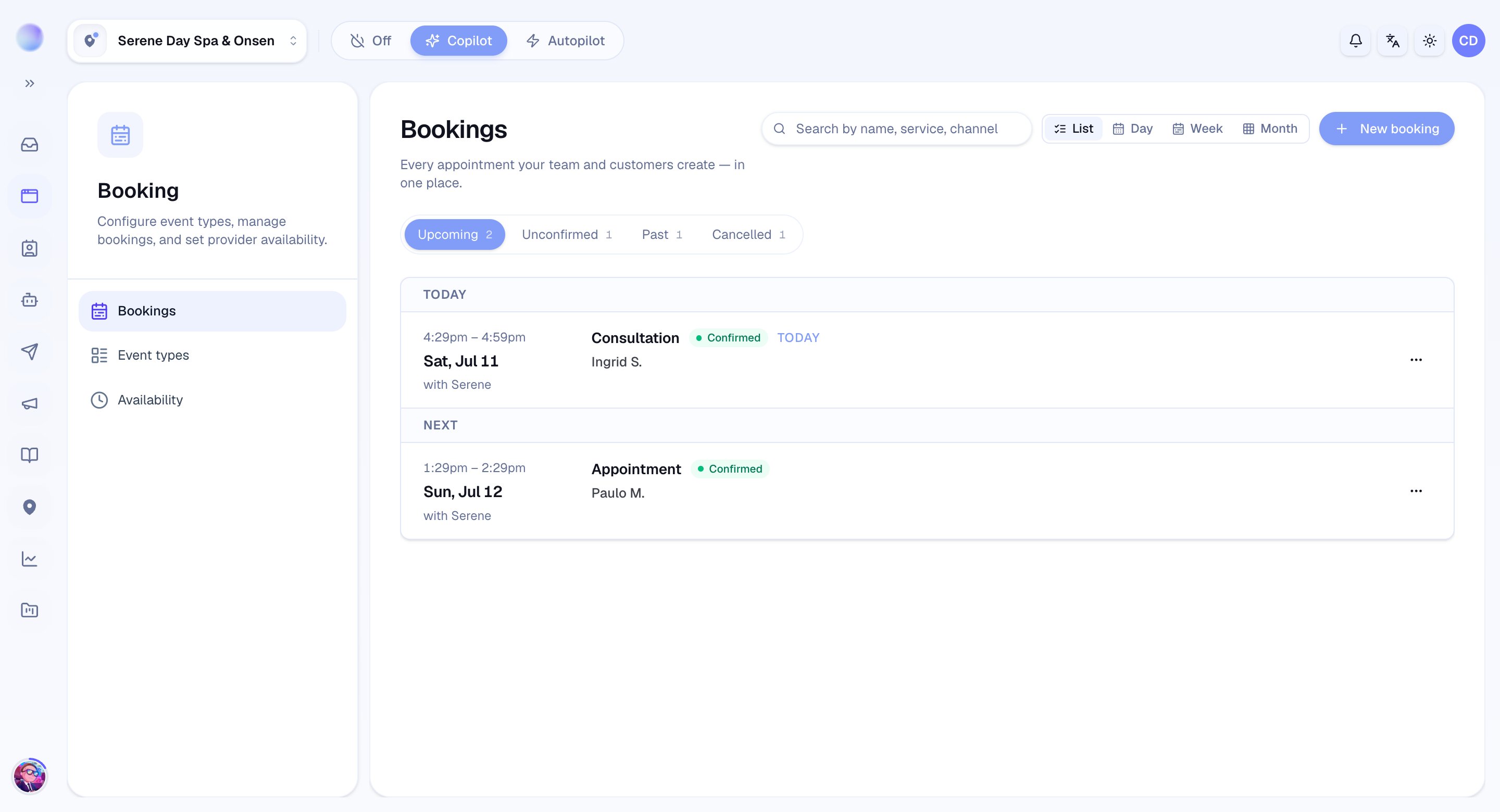
Each booking in Cura is a **calendar event** with a start and end time, linked to the **contact** and the **conversation** it came from. That link matters: from any appointment you can jump straight back to the chat, and from any chat you can see what's booked.
 ## Every booking has a status
A booking is always in one of four states, so you always know where things stand:
* **Confirmed** — locked in. The customer is expected, and reminders will go out.
* **Unconfirmed** — a request waiting on your team's approval. Every booking the AI makes starts here.
* **Cancelled** — called off after it was made.
* **Rejected** — a requested time you declined.
Bookings your AI makes always arrive as **unconfirmed** requests. The AI never tells a customer their booking is confirmed — it says the request has been submitted and your team will approve it. Nothing is locked in until a human confirms it.
## Your AI can take bookings on its own
When your **working hours**, **services**, and **availability** are set up, your AI can do the whole flow inside the conversation: check whether a slot is open, propose times, and submit the booking request. You don't have to be online for it to happen.
The AI also checks for clashes — it won't request a slot that overlaps an existing booking.
The AI only proposes times within the working hours and availability you define. If you haven't set those up yet, it won't guess — it'll gather details and let a human take it from there.
## You stay in control
Bookings the AI makes aren't out of your hands. Your team can **confirm**, **reschedule**, or **cancel** any appointment, and you can also **create a booking manually** for a walk-in or a phone call. Everything lands on the same calendar.
## Reminders reduce no-shows
For confirmed bookings linked to a contact, Cura can send **automatic email reminders** ahead of the appointment (24 hours and 1 hour before by default). Reminders are your simplest tool for making sure booked customers actually show up.
The fastest path to fewer no-shows is to confirm bookings promptly — only confirmed bookings get reminders. A confirmed booking with a reminder is far more likely to walk through your door than a request left waiting.
***
### Related articles
* [Setting working hours and availability](/bookings/working-hours-and-availability)
* [Confirming, rescheduling, and cancelling a booking](/bookings/confirm-reschedule-cancel)
* [Automatic booking reminders](/bookings/automatic-reminders)
* [How your AI agent works](/ai-agent/how-your-ai-agent-works)
## Every booking has a status
A booking is always in one of four states, so you always know where things stand:
* **Confirmed** — locked in. The customer is expected, and reminders will go out.
* **Unconfirmed** — a request waiting on your team's approval. Every booking the AI makes starts here.
* **Cancelled** — called off after it was made.
* **Rejected** — a requested time you declined.
Bookings your AI makes always arrive as **unconfirmed** requests. The AI never tells a customer their booking is confirmed — it says the request has been submitted and your team will approve it. Nothing is locked in until a human confirms it.
## Your AI can take bookings on its own
When your **working hours**, **services**, and **availability** are set up, your AI can do the whole flow inside the conversation: check whether a slot is open, propose times, and submit the booking request. You don't have to be online for it to happen.
The AI also checks for clashes — it won't request a slot that overlaps an existing booking.
The AI only proposes times within the working hours and availability you define. If you haven't set those up yet, it won't guess — it'll gather details and let a human take it from there.
## You stay in control
Bookings the AI makes aren't out of your hands. Your team can **confirm**, **reschedule**, or **cancel** any appointment, and you can also **create a booking manually** for a walk-in or a phone call. Everything lands on the same calendar.
## Reminders reduce no-shows
For confirmed bookings linked to a contact, Cura can send **automatic email reminders** ahead of the appointment (24 hours and 1 hour before by default). Reminders are your simplest tool for making sure booked customers actually show up.
The fastest path to fewer no-shows is to confirm bookings promptly — only confirmed bookings get reminders. A confirmed booking with a reminder is far more likely to walk through your door than a request left waiting.
***
### Related articles
* [Setting working hours and availability](/bookings/working-hours-and-availability)
* [Confirming, rescheduling, and cancelling a booking](/bookings/confirm-reschedule-cancel)
* [Automatic booking reminders](/bookings/automatic-reminders)
* [How your AI agent works](/ai-agent/how-your-ai-agent-works)