> ## Documentation Index
> Fetch the complete documentation index at: https://docs.cura.so/llms.txt
> Use this file to discover all available pages before exploring further.
# Workspace settings (location, timezone, contact details)
> A workspace is the home for one business or location.
A **workspace** is the home for one business or location. Its settings tell Cura where you are, what timezone you run on, and how customers can reach you — so your AI shares the right address, works in your local time, and reaches customers at the right hours.
By the end, you'll have set your location, timezone, contact details, and Quiet Hours for the workspace.
## Before you begin
* You'll need **Admin** or **Manager** access to the workspace you're editing.
* Have your business location, timezone, phone number, social handles, and a Google Maps link ready.
Settings here apply to *this* workspace only. If you run more than one branch, each workspace is set up separately — so a customer messaging your Sukhumvit branch gets Sukhumvit's hours and address.
***
* Go to **Settings → Workspaces**.
* Make sure the correct workspace is selected before you edit — changes apply to whichever workspace you're viewing.
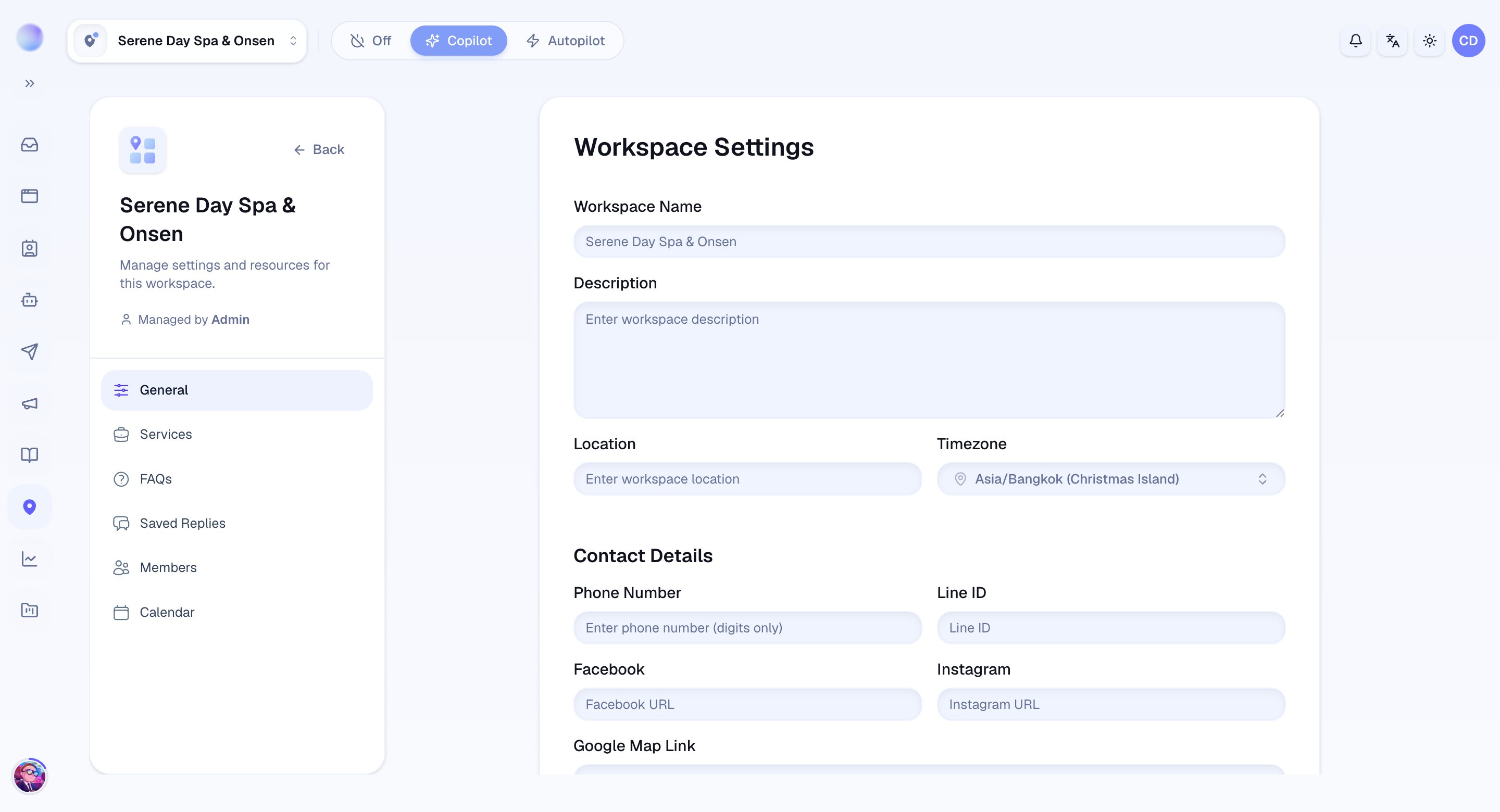
* **Location:** enter the address or area for this workspace. The AI can share this with customers who ask where you are.
* **Timezone:** choose the timezone this location runs in (e.g. *Asia/Bangkok*). This keeps bookings, reminders, and Quiet Hours all firing at the right local time.
Cura knows where and when this workspace operates.
Under **Contact Details**, give the AI the information it can share when customers ask how to reach you.
* **Phone Number:** your main contact number (digits only).
* **Line ID:** your LINE ID.
* **Facebook** and **Instagram:** your page or profile URLs.
* **Google Map Link:** a link customers can tap for directions.
The AI now has the details it needs to answer "how do I reach you?"
**Quiet Hours** pause automated workflow messages during the hours you choose, so customers don't get overnight notifications.
* Turn the **Quiet Hours** switch **on**.
* **Pause from** / **Resume at:** pick the start and end hours of the quiet window.
* **During quiet hours:** choose **Defer** (send when the window ends) or **Skip** (don't send at all).
* A live preview shows the current time in the workspace timezone so you can confirm the window lines up before saving.
Quiet Hours uses the **workspace timezone** set above. If automated messages ever go out at the wrong time of day, a timezone that doesn't match the branch is the usual cause.
Click **Save** to apply everything you've set for this workspace.
Your workspace is set up — location, timezone, contact details, and Quiet Hours are all in place.
***
## Deleting a workspace
Only **Admins** can delete a workspace. The button lives at the bottom of the workspace settings page.
Deleting a workspace is permanent. It removes that workspace's FAQs, services, Knowledge Base files and entries, calendar events and booking reminders, saved replies, and AI instructions. Conversations aren't deleted — they're unrouted. You'll be asked to type the workspace name to confirm.
## Troubleshooting
* **Bookings, reminders, or automated messages are at the wrong time.** Check the workspace **timezone** — this is the usual cause.
* **The AI shares the wrong address.** Confirm you edited the right workspace; details are per-workspace, not shared across branches.
 ***
### Related articles
* [Organization settings](/settings/organization-settings)
* [Knowledge settings](/settings/knowledge-settings)
* [Workspaces explained](/team/workspaces-explained)
* [Getting started with Cura](/getting-started/your-first-day)
***
### Related articles
* [Organization settings](/settings/organization-settings)
* [Knowledge settings](/settings/knowledge-settings)
* [Workspaces explained](/team/workspaces-explained)
* [Getting started with Cura](/getting-started/your-first-day)