

Before you begin
- Open a conversation in the Inbox.
- Open the details panel and expand Conversation actions.
- You’ll see your teammates listed if they’re members of the relevant workspace.
1
Open Conversation actions
In the details panel on the right, expand Conversation actions. The Assigned Agent selector is where you choose who handles the conversation.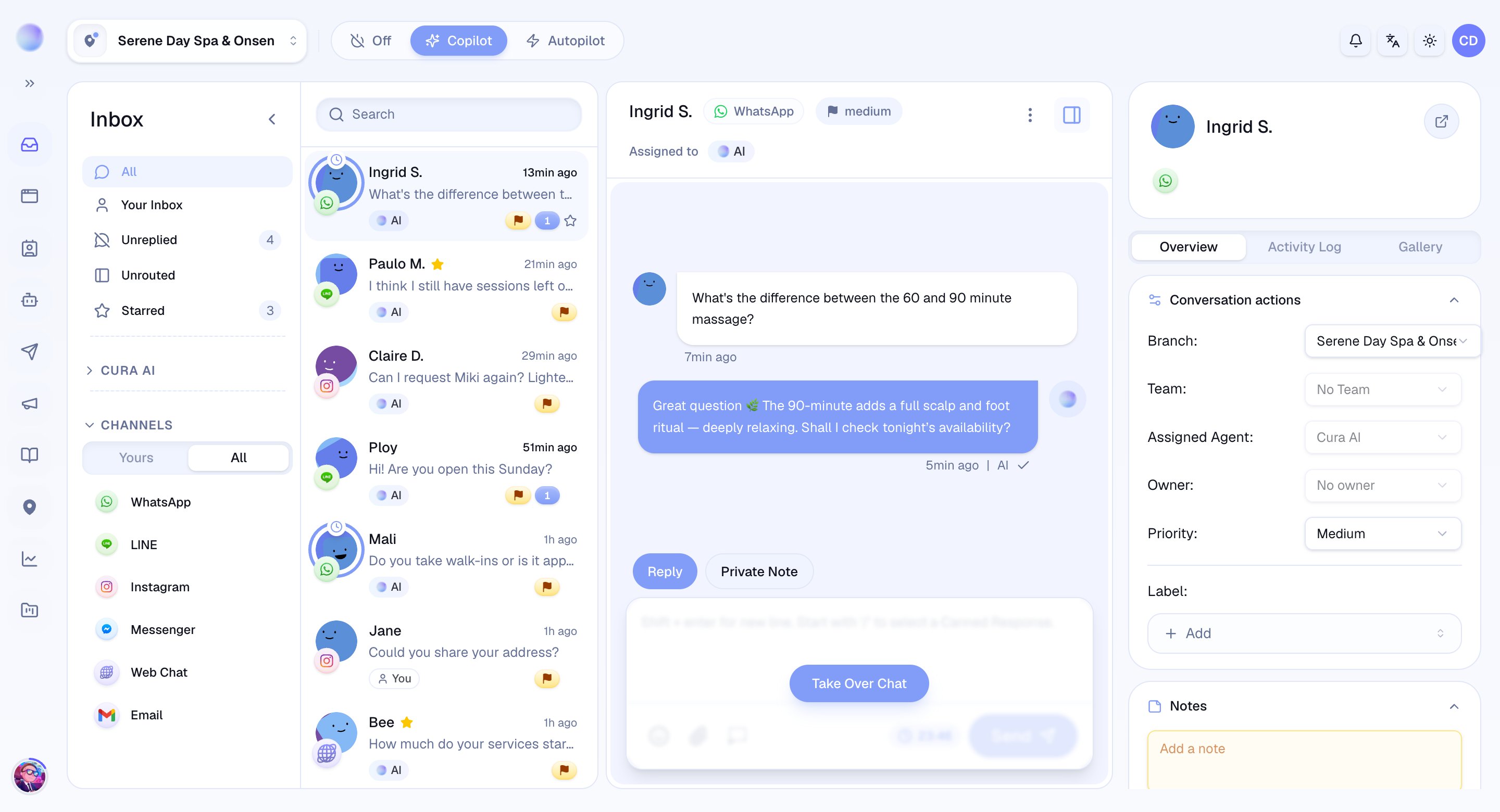
2
Choose a handler
Open the Assigned Agent selector and pick:
- Cura AI — let the AI handle the conversation.
- A teammate — assign it to a specific person. They become the handler and the conversation shows up in their Mine filter.
You’ve assigned the conversation — the right person (or the AI) is now responsible for it.
Assigning a conversation to a teammate is the same as a human taking over from the AI for that conversation. The AI steps aside until the conversation is handed back to Cura AI.
3
Set an owner (optional)
Separate from who’s actively handling a conversation, you can set an Owner — the person who’s accountable for it over time, even if someone else replies day to day.
- Open the Owner selector and choose a teammate, or No owner to clear it.
Troubleshooting
- A teammate isn’t in the list? They need to be a member of the conversation’s workspace. Add them in your team settings first.
- Can’t assign? If the channel is disconnected, reassignment is paused until it’s reconnected.